

English
This guide is intended to guide you through the basic functions of this unit.
For details, please refer to the Operation manual stored on the website.
Operation Manual MANUAL
Precaution
To prevent damage
Precautions before installation
Installation notes
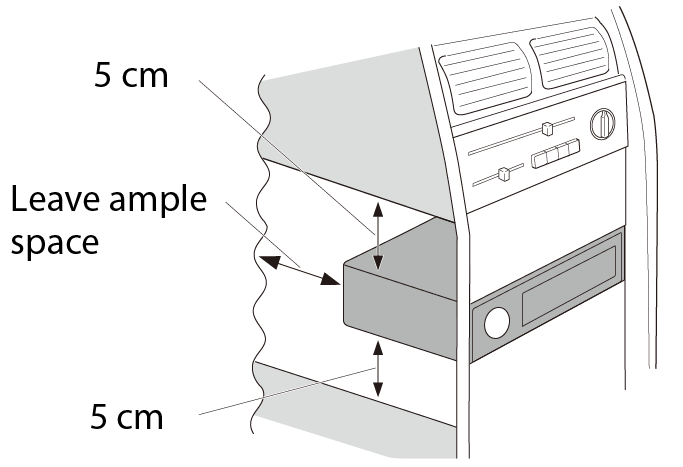
When installing, to ensure proper heat dispersal when using this unit, make sure you leave ample space behind the rear panel and wrap any loose cables so they are not blocking the vents.
To ensure safe driving
- LIGHT GREEN LEAD AT POWER CONNECTOR IS DESIGNED TO DETECT PARKED STATUS AND MUST BE CONNECTED TO THE POWER SUPPLY SIDE OF THE HANDBRAKE SWITCH. IMPROPER CONNECTION OR USE OF THIS LEAD MAY VIOLATE APPLICABLE LAW AND MAY RESULT IN SERIOUS INJURY OR DAMAGE.
- To avoid the risk of damage and injury and the potential violation of applicable laws, this product is not for use with a video image that is visible to the driver.
- In some countries the viewing of video image on a display inside a vehicle even by persons other than the driver may be illegal. Where such regulations apply, they must be obeyed.
If you attempt to watch video image while driving, the warning "Viewing of front seat video source while driving is strictly prohibited." will appear on the screen. To watch video image on this display, stop the vehicle in a safe place and apply the handbrake. Please keep the brake pedal pushed down before releasing the handbrake.
Android Auto™
- Compatible Android phone and compatible active data plan required.
- Some features may not be available in all countries and may vary by car and/or device manufacturer. Internet connection may be required. Use features when safe to do so.
Apple CarPlay
Apple CarPlay is not available in all languages and countries. Apple CarPlay operations and functions may vary depending on the iOS device or receiver.
Getting started
Meanings of symbols used in this manual

What's What
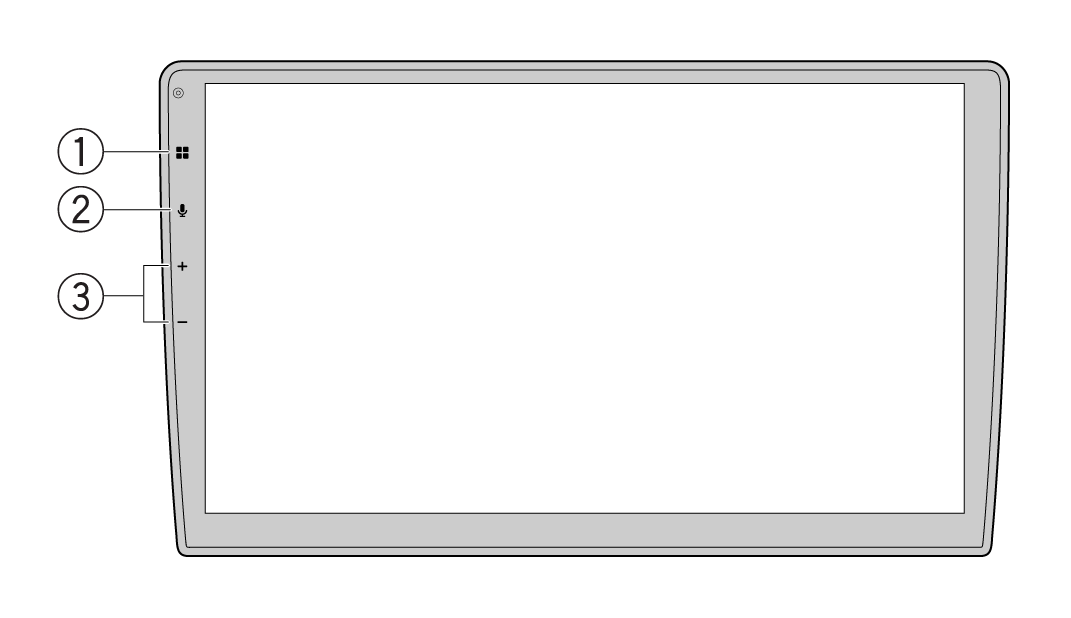
| 1 |
|
|
| 2 |
|
|
| 3 | VOL (+/-) |
|
Selecting the source · Tuner operation
Selecting the source
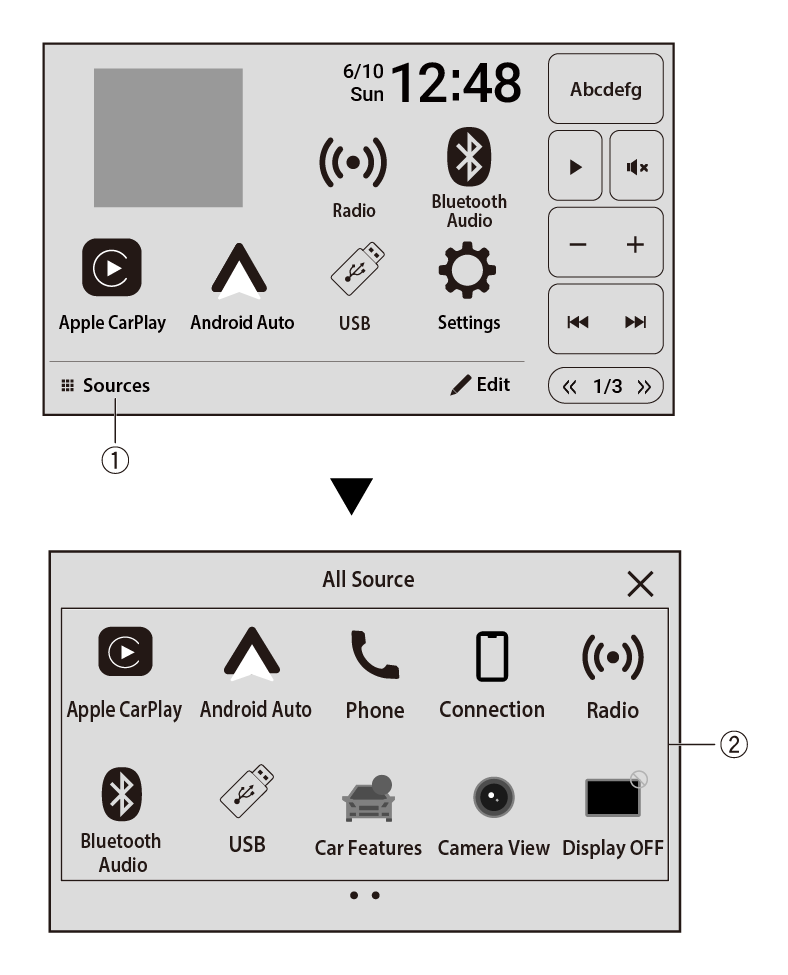
 Display all sources/applications
-
- Select a source
 Display hidden source
Tuner operation
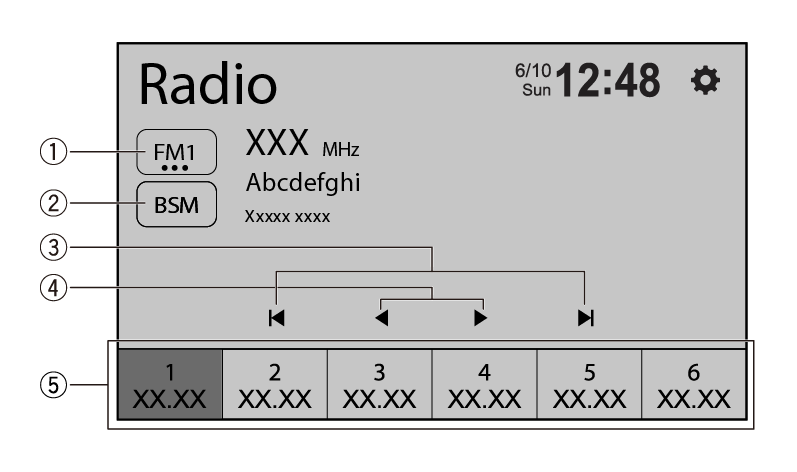
- Select a band
- Store the strongest broadcast frequencies
- Start seek tuning
- Tune into the next station
-
- Recall the preset channel stored to a key from memory
 Store the current broadcast frequency to a key
Moving images operation · Audio operation
Moving images operation
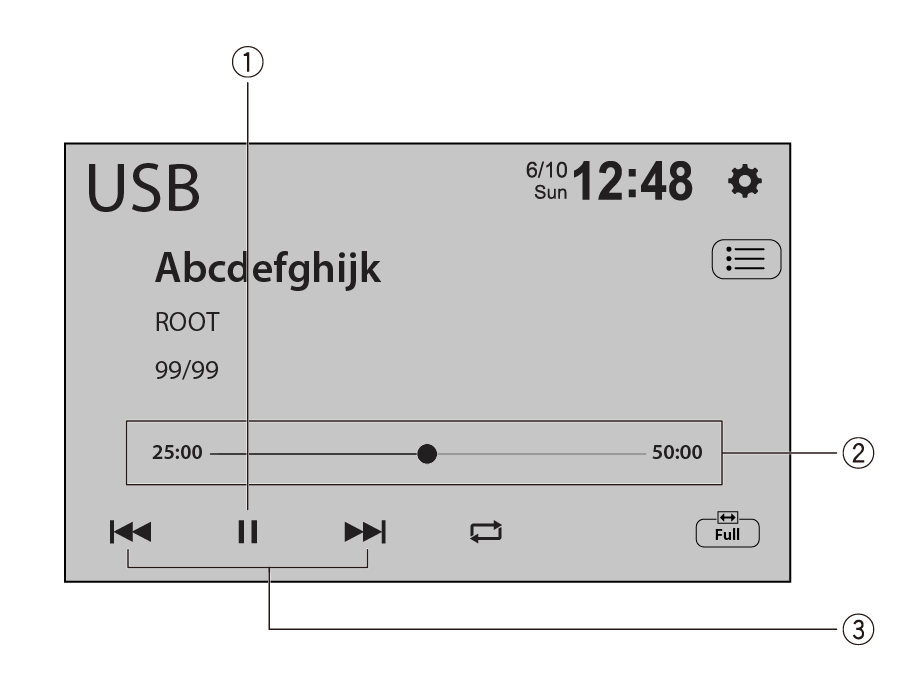
- Pause and start playback
- Change the playback point
-
- Select the previous file or the next file
- Perform fast forward or fast reverse
Audio operation
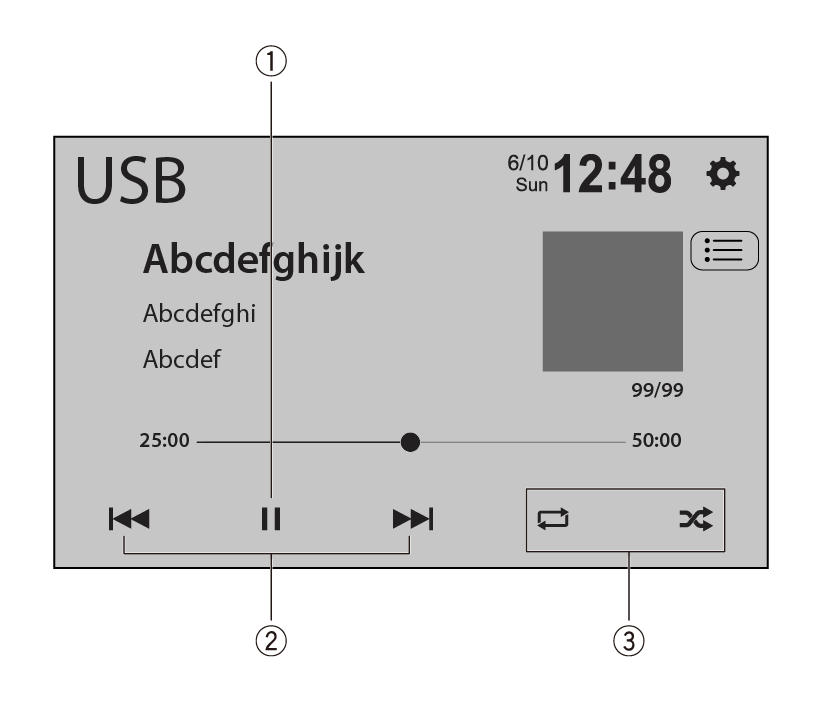
- Pause and start playback
-
- Select the previous file or the next file
- Perform fast forward or fast reverse
- Set the function for playing audio
List search operation · Bluetooth®
List search operation
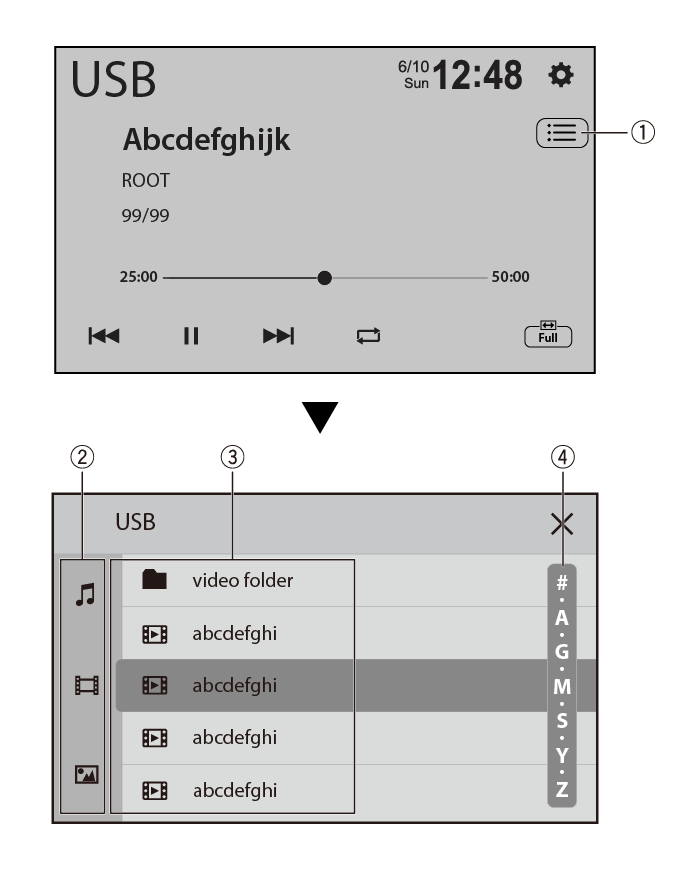
- Display the playlist screen
- Select the media file types
- Select a list title or folder that you want to play
 Scroll the list
Bluetooth® connection
- ▶ [Sources]. ▶ ▶ [Yes] or .
- Touch the Bluetooth device name.
Bluetooth telephone operation
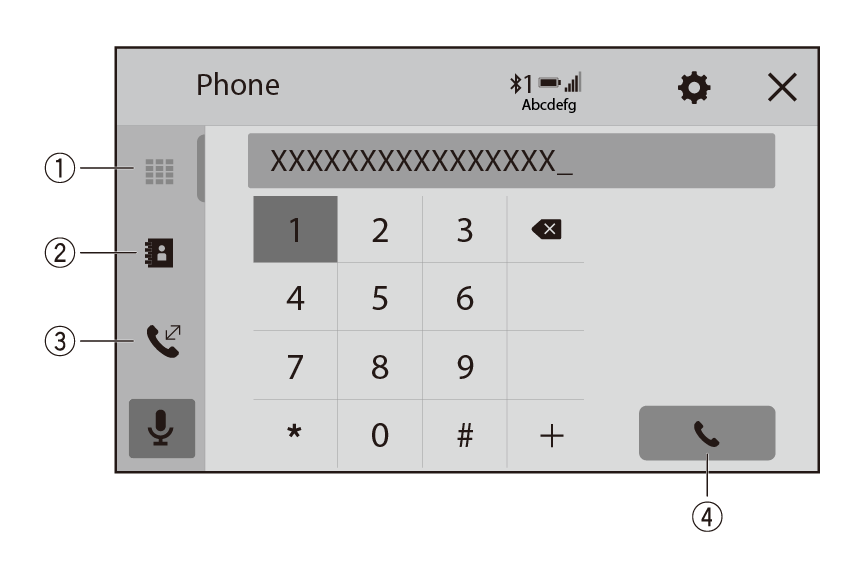
- Enter the phone number directly
- Switch to the phone book mode
- Switch to the call history list
- Make an outgoing call
Specifications
General
- Rated power source:14.4 V DC (10.5 V to 16.0 V allowable)
- Earthing system:Negative type
- Maximum current consumption:10.0 A
- Dimensions (W × H × D):
< DMH-AP1080BT >
Chassis (D): 188 mm × 108 mm × 37 mm
Nose: 252 mm × 147 mm × 12 mm < DMH-AP980BT >
Chassis (D): 188 mm × 108 mm × 37 mm
Nose: 229 mm × 131 mm × 13 mm - Weight: < DMH-AP1080BT > 1.1 kg < DMH-AP980BT > 0.9 kg
Display
- Screen size/aspect ratio: < DMH-AP1080BT > 10.1 inch wide/16:9 (effective display area: 222.72 mm × 125.28 mm) < DMH-AP980BT > 9.0 inch wide/16:9 (effective display area: 196.608 mm × 114.15 mm)
- Pixels:1 024 (Width) × 600 (Height) × 3 (RGB)
- Display method:TFT Active matrix driving
- Colour system:PAL/NTSC/PAL-M/PAL-N/SECAM compatible
- Temperature range:-10 ˚C to +60 ˚C
Audio
- Maximum power output:50 W × 4
- Continuous power output:22 W × 4 (50 Hz to 15 kHz, 5 %THD, 4 Ω LOAD, Both Channels Driven)
- Load impedance:4 Ω
- Preout output level (max):4.0 V
- Equaliser (13-Band Graphic Equaliser): Frequency: 50 Hz/80 Hz/125 Hz/200 Hz/315 Hz/500 Hz/800 Hz/1.25 kHz/2 kHz/3.15 kHz/5 kHz/8 kHz/12.5 kHz Gain: ±12 dB (2 dB/step)
- HPF: ON/OFF Frequency: 25 Hz/31.5 Hz/40 Hz/50 Hz/63 Hz/80 Hz/100 Hz/125 Hz/160 Hz/200 Hz/250 Hz Slope: -6 dB/oct, -12 dB/oct, -18 dB/oct, -24 dB/oct
- Time alignment:0 to 490 cm (1.4 cm/step)
- Speaker level:+10 dB to -24 dB (1 dB/step)
Bluetooth
- Version:Bluetooth 5.4 certified
- Output power:+4 dBm Max. (Power class 2)
- Frequency band(s):2 402.0 MHz to 2 480.0 MHz
- Bluetooth profiles:HFP (Hands Free Profile) 1.8
PBAP (Phone Book Access Profile) 1.2.3
A2DP (Advanced Audio Distribution Profile) 1.3.2
AVRCP (Audio/Video Remote Control Profile) 1.6.3
AVCTP (Audio/Video Control Transport Protocol) 1.4
AVDTP (Audio/Video Distribution Transport Protocol) 1.3
GAVDP (Generic Audio/Video Distribution Profile) 1.3
IOP (Interoperability Test Specification)
RFCOMM (RFCOMM with TS 07.10) 1.1
FM tuner
- Frequency range:76.0 MHz to 108.0 MHz, 87.5 MHz to 108.0 MHz
- Usable sensitivity:12 dBf (1.1 μV/75 Ω, mono, S/N: 30 dB)
- Signal-to-noise ratio:50 dB (IEC-A network)
AM tuner
- Frequency range:530 kHz to 1 640 kHz (10 kHz), 531 kHz to 1 602 kHz (9 kHz)
- Usable sensitivity:28 μV (S/N: 20 dB)
- Signal-to-noise ratio:45 dB (IEC-A network)
Wi-Fi®
- Version:IEEE 802.11 a/n/ac (5 GHz)
- Frequency channel:149 ch (5 GHz)
- Security:WPA2 (Personal), WPA3 (Personal)
- Output power:+13.0 dBm Max (5 GHz)
GPS
- GNSS receiver
System: GPS L1C/Ac, SBAS L1C/A, GLONASS L1OF, Galileo E1B/C
SPS (Standard Positioning Service) Reception system: 64 channel Multi-channel reception system Reception frequency: 1 575.42 MHz/1 602 MHz Sensitivity: -140 dBm (typ) Frequency: Approx. once per second - GPS aerial Aerial: Micro strip flat aerial/right-handed helical polarization Aerial cable: 3 m Dimensions (W × H × D): 38.3 mm × 35 mm × 13.5 mm Weight: 65.0 g
USB
- USB standard spec:USB 1.1, USB 2.0 full speed, USB 2.0 high speed
- Max current supply:1.5 A
- USB Class:MSC (Mass Storage Class)
- File system:FAT16, FAT32, NTFS
- <USB audio>
MP3 decoding format: MPEG-1 & 2 & 2.5 Audio Layer 3
WMA decoding format: Ver. 7, 8, 9, 9.1, 9.2 (2 ch audio) (Windows Media Player)
AAC decoding format: MPEG-4 AAC (iTunes encoded only) (Ver. 12.5 and earlier)
FLAC decoding format (MSC Mode only): Ver. 1.3.0
Sampling frequency: 8 kHz to 192 kHz WAV signal format (MSC Mode only): Linear PCM
Sampling frequency: 16 kHz to 192 kHz - <USB image>
JPEG decoding format (MSC Mode only): .jpeg, .jpg
Pixel Sampling: 4:2:2, 4:2:0
Decode Size: MAX: 5 000 (H) × 5 000 (W)
(Maximum file size: 6 MB)
(Minimum file size: 10 KB) PNG decoding format (MSC Mode only): .png
Decode Size: MAX: 576 (H) × 720 (W) BMP decoding format (MSC Mode only): .bmp
Decode Size: MAX: 936 (H) × 1 920 (W)
<USB video>
Playable video format (container)
Trademark · Copyright
- Android Auto is a trademark of Google LLC.
- Apple CarPlay, iTunes and QuickTime are trademarks of Apple Inc., registered in the U.S. and other countries and regions.
- Use of the Apple CarPlay logo means that a vehicle user interface meets Apple performance standards. Apple is not responsible for the operation of this vehicle or its compliance with safety and regulatory standards. Please note that the use of this product with iPhone may affect wireless performance.
- The Bluetooth® word mark and logos are registered trademarks owned by Bluetooth SIG, Inc. and any use of such marks by PIONEER CORPORATION is under license. Other trademarks and trade names are those of their respective owners.
- Wi-Fi is a registered trademark of Wi-Fi Alliance®.
- Microsoft and Windows Media are trademarks of the Microsoft group of companies.
PIONEER CORPORATION
28-8, Honkomagome 2-chome, Bunkyo-ku,
Tokyo 113-0021, Japan
PIONEER ELECTRONICS (USA) INC.
P.O. BOX 1720, Long Beach, CA 90801-1720, U.S.A.
TEL: (800) 421-1404
PIONEER EUROPE NV
Haven 1087, Keetberglaan 1, B-9120 Melsele, Belgium/Belgique
TEL: (0) 3/570.05.11
PIONEER ELECTRONICS ASIACENTRE PTE. LTD.
No. 2 Jalan Kilang Barat, #04-02, Singapore 159346
TEL: 65-6378-7888
PIONEER ELECTRONICS AUSTRALIA PTY. LTD.
Unit 13, 153-155 Rooks Road, Vermont, Victoria, 3133 Australia
TEL: (03) 9586-6300
PIONEER ELECTRONICS DE MÉXICO S.A. DE C.V.
Blvd. Manuel Ávila Camacho #118, Piso 12, Lomas de Chapultepec,
Alcaldía Miguel Hidalgo C.P. 11000, Ciudad de México
Tel: 52-55-9178-4270
先鋒電子(香港)有限公司
香港九龍長沙灣道909號5樓
電話: 852-2848-6488
Español
Esta guía tiene como fin explicar las funciones básicas de esta unidad.
Para obtener más información, consulte el manual de operaciones que se encuentra en el sitio web.
Manual de Operación MANUAL
Precauciones
Para evitar daños
Precauciones antes de la instalación
Notas de la instalación
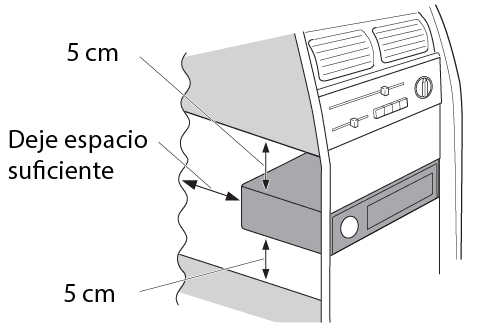
Cuando se lleve a cabo la instalación, para garantizar la correcta dispersión del calor al utilizar este producto, asegúrese de dejar un espacio amplio detrás del panel trasero y enrollar los cables sueltos para que no obstruyan las aberturas de ventilación.
Para garantizar una conducción segura
- EL CABLE VERDE CLARO DEL CONECTOR DE ALIMENTACIÓN ESTÁ DISEÑADO PARA DETECTAR EL ESTADO ESTACIONADO DEL VEHÍCULO Y DEBE CONECTARSE EN EL LADO DE LA FUENTE DE ENERGÍA DEL INTERRUPTOR DEL FRENO DE MANO. LA CONEXIÓN O EL USO INCORRECTOS DE ESTE CABLE PODRÍAN INFRINGIR LA LEY APLICABLE Y PRODUCIR LESIONES O DAÑOS GRAVES.
- Para evitar el riesgo de daños y lesiones y la posible infracción de las leyes aplicables, este producto no debe utilizarse con una imagen de video que sea visible para el conductor.
- En algunos países, la visualización de imágenes de video en una pantalla dentro de un vehículo incluso por personas distintas al conductor podría estar prohibida por la ley. Deben obedecerse estas disposiciones en los lugares donde estén vigentes.
Si intenta ver una imagen de video mientras conduce, aparecerá en la pantalla la siguiente advertencia: "Está terminantemente prohibido utilizar la fuente de video del asiento delantero durante el manejo.". Para ver una imagen de video en esta pantalla, detenga el vehículo en un lugar seguro y accione el freno de mano. Pise el pedal del freno sin soltarlo antes de quitar el freno de mano.
Android Auto™
- Se requiere un teléfono Android compatible y un plan de datos activo compatible.
- Algunas funciones pueden no estar disponibles en todos los países y pueden variar según el fabricante del automóvil y/o del dispositivo. Puede ser necesario contar con conexión a Internet. Utilice las funciones cuando sea seguro hacerlo.
Apple CarPlay
Apple CarPlay no está disponible en todos los idiomas ni en todos los países. Las operaciones y funciones de Apple CarPlay pueden variar según el dispositivo iOS o el receptor.
Inicio
Significado de los símbolos utilizados en este manual

Qué es qué
| 1 |
|
|
| 2 |
|
|
| 3 | VOL (+/-) |
|
Selección de fuente · Operación del sintonizador
Selección de fuente
- Muestra todas las fuentes/aplicaciones
-
- Selecciona una fuente
- Muestra la fuente oculta
Operación del sintonizador
- Selecciona una banda
- Almacena las frecuencias de transmisión más potentes
- Inicia la búsqueda de sintonización
- Sintoniza la siguiente estación
-
- Recupera la memoria el canal preestablecido almacenado en una tecla
- Almacena en una tecla la frecuencia de transmisión actual
Operación de imágenes en movimiento · Operación de audio
Operación de imágenes en movimiento
- Pausar e iniciar la reproducción
- Cambia el punto de reproducción
-
- Selecciona el archivo anterior o el siguiente archivo
- Adelanta o retrasa rápidamente
Operación de audio
- Pausar e iniciar la reproducción
-
- Selecciona el archivo anterior o el siguiente archivo
- Adelanta o retrasa rápidamente
- Configura la función de reproducción de audio
Operación de búsqueda en lista · Bluetooth®
Operación de búsqueda en lista
- Muestra la pantalla de la lista de reproducción
- Selecciona los tipos de archivo multimedia
- Selecciona un título de la lista o carpeta que desea reproducir
- Desplaza la lista
Conexión Bluetooth®
- ▶ [Fuentes]. ▶ ▶ [Sí] o .
- Toca el nombre del dispositivo Bluetooth.
Operación del teléfono Bluetooth
- Ingresar el número de teléfono directamente
- Cambiar al modo de directorio de teléfonos
- Cambiar a la lista del historial de llamadas
- Realizar una llamada saliente
Especificaciones
General
- Fuente de alimentación nominal:14,4 V cc (10,5 V a 16,0 V admisible)
- Sistema de conexión a tierra:tipo negativo
- Consumo máximo de corriente:10,0 A
- Dimensiones (An. × Al. × Prof.):
< DMH-AP1080BT >
Bastidor (D): 188 mm × 108 mm × 37 mm
Cara anterior: 252 mm × 147 mm × 12 mm < DMH-AP980BT >
Bastidor (D): 188 mm × 108 mm × 37 mm
Cara anterior: 229 mm × 131 mm × 13 mm - Peso: < DMH-AP1080BT > 1,1 kg < DMH-AP980BT > 0,9 kg
Pantalla
- Tamaño de la pantalla/relación: < DMH-AP1080BT > 10,1 pulg. de ancho/16:9 (área de pantalla efectiva: 222,72 mm × 125,28 mm) < DMH-AP980BT > 9,0 pulgadas de ancho/16:9 (área de pantalla efectiva: 196,608 mm × 114,15 mm)
- Píxeles:1 024 (ancho) × 600 (alto) × 3 (RGB)
- Método de visualización:matriz activa TFT
- Compatible con el sistema de color:PAL/NTSC/PAL-M/PAL-N/SECAM
- Rango de temperatura:de -10 ˚C a +60 ˚C
Audio
- Salida de potencia máxima:50 W × 4
- Salida de potencia continua:22 W × 4 (50 Hz a 15 kHz, 5 %THD, 4 Ω CARGA, Ambos canales activos)
- Impedancia de carga:4 Ω
- Nivel de salida del preamplificador (máximo):4,0 V
- Ecualizador (ecualizador gráfico de 13 bandas): Frecuencia: 50 Hz/80 Hz/125 Hz/200 Hz/315 Hz/500 Hz/800 Hz/1,25 kHz/2 kHz/3,15 kHz/5 kHz/8 kHz/12,5 kHz Ganancia: ±12 dB (2 dB/paso)
- HPF: ACT./DES. Frecuencia: 25 Hz/31,5 Hz/40 Hz/50 Hz/63 Hz/80 Hz/100 Hz/125 Hz/160 Hz/200 Hz/250 Hz Pendiente: -6 dB/oct, -12 dB/oct, -18 dB/oct, -24 dB/oct
- Alineamiento de tiempo:de 0 a 490 cm (1,4 cm pulgada/incremento)
- Nivel de la bocina:+10 dB a -24 dB (1 dB/paso)
Bluetooth
- Versión:Certificada para Bluetooth 5.4
- Potencia de salida:+4 dBm máx. (clase 2)
- Bandas de frecuencia:De 2 402,0 MHz a 2 480,0 MHz
- Perfiles Bluetooth:HFP (Perfil de manos libres) 1.8
PBAP (Perfil de acceso a la agenda telefónica) 1.2.3
A2DP (Perfil de distribución de audio avanzado) 1.3.2
AVRCP (Perfil del control remoto de audio/video) 1.6.3
AVCTP (Protocolo de control de transporte de audio/video) 1.4
AVDTP (Protocolo de transporte de distribución de audio/video) 1.3
GAVDP (Perfil de distribución de audio/video genérico) 1.3
IOP (Especificación de la prueba de interoperabilidad)
RFCOMM (RFCOMM con TS 07.10) 1.1
Sintonizador FM
- Rango de frecuencias:de 76,0 MHz a 108,0 MHz, de 87,5 MHz a 108,0 MHz
- Sensibilidad utilizable:12 dBf (1,1 μV/75 Ω, monoaural, señal/ruido: 30 dB)
- Relación señal-ruido:50 dB (red IEC-A)
Sintonizador AM
- Rango de frecuencias:de 530 kHz a 1 640 kHz (10 kHz), de 531 kHz a 1 602 kHz (9 kHz)
- Sensibilidad utilizable:28 μV (relación señal/ruido: 20 dB)
- Relación señal-ruido:45 dB (red IEC-A)
Wi-Fi®
- Versión:IEEE 802,11 a/n/ac (5 GHz)
- Canal de frecuencia:Canal 149 (5 GHz)
- Seguridad:WPA2 (personal), WPA3 (personal)
- Salida de potencia:+13,0 dBm Máx. (5 GHz)
GPS
- Receptor GNSS
Sistema: GPS L1C/Ac, SBAS L1C/A, GLONASS L1OF, Galileo E1B/C
SPS (servicio de posicionamiento estándar) Sistema de recepción: sistema de recepción multicanal de 64 canales Frecuencia de recepción: 1 575,42 MHz/1 602 MHz Sensibilidad: -140 dBm (típ.) Frecuencia: aprox. una vez por segundo - Antena GPS Antena: antena plana microstrip/polarización helicoidal derecha Cable de antena: 3 m Dimensiones (An. × Al. × Prof.): 38,3 mm × 35 mm × 13,5 mm Peso: 65,0 g
USB
- Especificación de USB estándar:USB 1.1, USB 2.0 de alta velocidad, USB 2.0 de alta velocidad
- Máxima corriente suministrada:1,5 A
- USB Clase:MSC (Clase de almacenamiento masivo)
- Sistema de archivos:FAT16, FAT32, NTFS
- <Audio USB>
Formato de decodificación de MP3: MPEG-1 y 2 y 2.5 Audio Layer 3
Formato de decodificación de WMA: Ver. 7, 8, 9, 9.1, 9.2 (audio de 2 canales) (Windows Media Player)
Formato de decodificación de AAC: MPEG-4 AAC (codificación de iTunes únicamente) (Ver. 12.5 y anterior)
Formato de decodificación FLAC (solo en el modo MSC): Ver. 1.3.0
Frecuencia de muestreo: De 8 kHz a 192 kHz Formato de señal WAV (solo en el modo MSC): PCM lineal
Frecuencia de muestreo: De 16 kHz a 192 kHz - <imagen USB>
Formato de decodificación JPEG (solo en el modo MSC): .jpeg, .jpg
Muestreo de píxeles: 4:2:2, 4:2:0
Tamaño de descodificación: MÁX.: 5 000 (Al.) × 5 000 (An.)
(Tamaño máximo de archivo: 6 MB)
(Tamaño mínimo de archivo: 10 KB) Formato de decodificación PNG (solo en el modo MSC): .png
Tamaño de descodificación: MÁX.: 576 (Al.) × 720 (An.) Formato de decodificación BMP (solo en el modo MSC): .bmp
Tamaño de descodificación: MÁX.: 936 (Al.) × 1 920 (An.)
<video USB>
Formato de video para reproducir (contenedor)
Marca registrada · Derechos de autor
- Android Auto es una marca de Google LLC.
- Apple CarPlay, iTunes y QuickTime son marcas comerciales de Apple Inc. registradas tanto en EE. UU. como en otros países y regiones.
- El uso del logotipo de Apple CarPlay significa que la interfaz de usuario de un vehículo cumple con las normas de rendimiento de Apple. Apple no es responsable del funcionamiento de este vehículo ni de que cumpla con las normas reglamentarias y de seguridad. Tenga en cuenta que el uso de este producto con un iPhone puede afectar el rendimiento inalámbrico.
- La marca literal y los logotipos de Bluetooth® son marcas registradas propiedad de Bluetooth SIG, Inc., y cualquier uso de dichas marcas por PIONEER CORPORATION se hace bajo licencia. Otras marcas y nombres comerciales son propiedad de sus respectivos propietarios.
- Wi-Fi es una marca comercial registrada de Wi-Fi Alliance®.
- Microsoft y Windows Media son marcas comerciales del grupo de empresas Microsoft.
PIONEER CORPORATION
28-8, Honkomagome 2-chome, Bunkyo-ku,
Tokyo 113-0021, Japan
PIONEER ELECTRONICS (USA) INC.
P.O. BOX 1720, Long Beach, CA 90801-1720, U.S.A.
TEL: (800) 421-1404
PIONEER EUROPE NV
Haven 1087, Keetberglaan 1, B-9120 Melsele, Belgium/Belgique
TEL: (0) 3/570.05.11
PIONEER ELECTRONICS ASIACENTRE PTE. LTD.
No. 2 Jalan Kilang Barat, #04-02, Singapore 159346
TEL: 65-6378-7888
PIONEER ELECTRONICS AUSTRALIA PTY. LTD.
Unit 13, 153-155 Rooks Road, Vermont, Victoria, 3133 Australia
TEL: (03) 9586-6300
PIONEER ELECTRONICS DE MÉXICO S.A. DE C.V.
Blvd. Manuel Ávila Camacho #118, Piso 12, Lomas de Chapultepec,
Alcaldía Miguel Hidalgo C.P. 11000, Ciudad de México
Tel: 52-55-9178-4270
先鋒電子(香港)有限公司
香港九龍長沙灣道909號5樓
電話: 852-2848-6488